Monday, June 18, 2012

SharePoint 2010 FBA : Forgot Password Page (asp.net Membergship)


Forgot Password SharePoint 2010 FBA or 
Password Recovery page


<%@ Page Language="C#" AutoEventWireup="true" CodeBehind="ForgotPassword.aspx.cs"
    Inherits="Extranet.ApplicationPages.ForgotPassword" MasterPageFile="~/_layouts/simple.master" %>

<asp:Content ID="PageHead" ContentPlaceHolderID="PlaceHolderAdditionalPageHead" runat="server">
</asp:Content>
<asp:content contentplaceholderid="PlaceHolderIcon" runat="server">
   <img   title="pgclogo" border="0" alt="PGC Logo" src="/_layouts/images/logo.gif"  />
</asp:content>
<asp:content id="Main" contentplaceholderid="PlaceHolderMain" runat="server">

<div>

// Please update your MembershipProvidename here
     <asp:PasswordRecovery ID="PasswordRecovery12" BorderPadding="4" Runat="server" MembershipProvider="SQLMembershipProvider" >

      </asp:PasswordRecovery>
      
</div>


</asp:content>
<asp:Content ID="PageTitle" ContentPlaceHolderID="PlaceHolderPageTitle" runat="server">
    Forgot Password
</asp:Content>
<asp:content id="PageTitleInTitleArea" contentplaceholderid="PlaceHolderPageTitleInTitleArea"
    runat="server">
Forgot Password
</asp:content>


namespace Extranet.ApplicationPages
{
    public partial class ForgotPassword : UnsecuredLayoutsPageBase
    {
        protected void Page_Load(object sender, EventArgs e)
        {
        }

       //protected void PasswordRecovery1_SendingMail(object sender, MailMessageEventArgs e)
        //{
        //    e.Message.IsBodyHtml = false;
        //    e.Message.Subject = "New password on Web site.";
        //}


        //it allows access this page to anonymous users by overriding AllowAnonymousAccess method
        protected override bool AllowAnonymousAccess
        {
            get
            {
                return true;
            }
        }
    }
}


web.config change

<system.net>
    <mailSettings>
      <smtp deliveryMethod="Network" from="update your address">
        <network
        defaultCredentials="true"
        host="yourhostname"
        port="25"
        />
      </smtp>
    </mailSettings>
  </system.net>

Membership connectionstring

 <add connectionStringName="SQLConnectionString" passwordAttemptWindow="5" enablePasswordRetrieval="false" enablePasswordReset="true" requiresQuestionAndAnswer="true" applicationName="/" requiresUniqueEmail="true" passwordFormat="Hashed" description="Stores and Retrieves membership data from SQL Server" name="SQLMembershipProvider" type="System.Web.Security.SqlMembershipProvider, System.Web, Version=2.0.3600.0, Culture=neutral, PublicKeyToken=b03f5f7f11d50a3a" minRequiredPasswordLength="5" minRequiredNonalphanumericCharacters="0" />


SharePoint 2010: Hide error icon in sign in or login page


Sharepoint 2010 FBA: Hide error icon in sign in page 

<style>
//this will hide the icon
.s4-simple-iconcont
{
    display:none;
}

//it will change height, border and width 

BODY #s4-simple-card
{

margin: 25px auto 0px !important;

width: 700px !important;
height:300px !important;
}

BODY #s4-simple-content

{

margin-left:0px !important;

}

BODY #s4-simple-card H1

{

display:none !important;

}
</style>

SharePoint 2010 : How do i change error icon in sign in page


//add below content placeholder to your sign in page 
 <asp:Content ContentPlaceHolderId="PlaceHolderIcon" runat="server">
   <img   title="pgclogo" border="0" alt="PGC Logo" src="/_layouts/images/logo.gif"  />
</asp:Content>


Tuesday, June 5, 2012

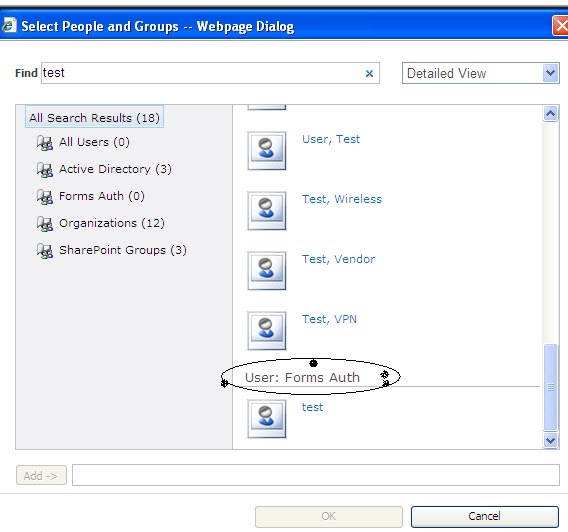
Sharepoint 2010 FBA users not found in People Picker


In IIS Manager, browse to the Central Admin web application. Explore the folder and find the web.config file. Open in Notepad.
Find the <PeoplePickerWildcards> node and use the following:


<PeoplePickerWildcards>
    <clear />
    <add key="FBA" value="%" />
  </PeoplePickerWildcards>

still if you are having same problem follow this post, it could be sql server permissions issue.


Warning: this page is not encrypted for secure communication. User names, passwords, and any other information will be sent in clear text. For more information, contact your administrator. The server could not sign you in. Make sure your user name and password are correct, and then try again.


First make sure user is avilable in the database that you are trying to log in. if user is in database and not able log in follow below post.
Here is the post to resolve this error
http://suryapulipati.blogspot.com/2012/06/exception-occurred-when-trying-to-issue.html

if you are getting "access denied" error you have add user to sharepoint group.

An exception occurred when trying to issue security token: The security token username and password could not be validated. + FBA Sharepoint 2010

This error might be caused due to various reasons

Main reason :Service account has not added to your FBA database.

IIS >Application pools > SharePoint Central Administration v4  > Advanced settings >

under process model > identity > you can see service account  here


2nd reason :  check your web service web.config file, you need to include below code 
Go to IIS Manager>SharePoint Web Services\SecurityTokenserviceapplication

Or

C:\Program Files\Common Files\Microsoft Shared\Web Server Extensions\14\WebServices\SecurityToken\web.config 


<system.web>
    <roleManager>
      <providers>
        <add connectionStringName="SQLConnectionString"
            applicationName="/"
            description="Stores and retrieves roles from SQL Server"
            name="SQLRoleProvider" type="System.Web.Security.SqlRoleProvider, System.Web, Version=2.0.3600.0, Culture=neutral, PublicKeyToken=b03f5f7f11d50a3a" />
      </providers>
    </roleManager>
    <membership>
      <providers>
        <add connectionStringName="SQLConnectionString"
            passwordAttemptWindow="5"
            enablePasswordRetrieval="false"
            enablePasswordReset="true"
            requiresQuestionAndAnswer="true"
            applicationName="/"
            requiresUniqueEmail="true"
            passwordFormat="Hashed"
            description="Stores and Retrieves membership data from SQL Server"
            name="SQLMembershipProvider"
            type="System.Web.Security.SqlMembershipProvider, System.Web, Version=2.0.3600.0, Culture=neutral, PublicKeyToken=b03f5f7f11d50a3a" />
      </providers>
    </membership>
  </system.web>

</configuration>


Followers